Monday, 27 April 2009

Method with arbitrary number of parameters in C#

One can also create a method with variable number of parameters in C#. It is needed, for example, when you have such logic, where you need to take value from one place, if it is not null, or from the other, or from the third place, if the first two are nulls, and so on. This can help:

public static T FirstNotNull<T>(params Nullable<T>[] objects) where T : struct
{
  foreach (Nullable<T> obj in objects)
    if (obj.HasValue) return obj.Value;
  return default(T);
}

Reserved word params shows, that we deal with an array of parameters. This parameter can only be the last one in a function. You can put other types of parameters before, but no after.

The function can be called like that:

HelperClass.FirstNotNull<int>(firstValue, secondValue, thirdValue, fourthValue);

The first not null value of these four is returned, or default value of the type, if all are nulls.

Tuesday, 31 March 2009

System.Reflection To the Rescue

Many people ask if there is a possibility to call a method, if we have its name as string. Actually, it is very useful feature. Imagine we have an Object with several properties which represent the same thing, but in different languages.

class MyClass
{
    public string State_EN;
    public string State_DE;
    public string State_RU;
}

We want to show the state of MyClass object in proper language. We create a method for that

public string State(string language)
{
}

Language is the 2-letter code representation of language ("EN", "DE", "RU"...). So what should be inside the State method? Solutions with "if" and "switch" are not good - if you have to add more languages, you must rewrite the State method. But we are lazy and don't want to do that. What we need here is System.Reflection.

using System.Reflection;
[...]
public string State(string language)
{
    PropertyInfo property = typeof(MyClass).GetProperty("State_" + language);//find the property
    if (property != null)
        return (string)property.GetValue(this, null);//get value of the property
    return null;
}

The same way we can search for method, if we know the method's name (with GetMethod instead of GetProperty). And call it with "Invoke" and proper parameters.

Wednesday, 18 March 2009

Using Generics With System.Nullable<T>

When we have a Nullable type value and we want to assign it to some control, then we need to check if is not null first.

SomeLabel.Text = object.MyProperty.HasValue ? object.MyProperty.Value : String.Empty;

But if we have many nullable properties? I don't want to copy/paste this check on every line. So we need a method, that checks for nulls. But I also don't want several methods for every type. So we need to use generics.

I created some methods for myself

public static string ValueOrEmptyString<T>(Nullable<T> obj) where T : struct
{
  return obj.HasValue ? obj.Value.ToString() : "";
}

public static T ValueOrDefault<T>(Nullable<T> obj, T defaultValue) where T : struct
{
  return obj.HasValue ? obj.Value : defaultValue;
}

public static T ValueOrDefault<T>(Nullable<T> obj) where T : struct
{
  return obj.HasValue ? obj.Value : default(T);
}

"where T : struct" - is needed for compiler to understand that this method is allowed only for types that belong to System.ValueType.

I can use these methods like that

SomeLabel.Text = ValueOrEmptyString<int>( object.MyIntProperty );
SomeDateTimeControl.Date = ValueOrDefault<DateTime>( object.MyDateTimeProperty );
SomeReferenceControl.SelectedObjecId = ValueOrDefault<int>( object.MyIntProperty, -1 );

Wednesday, 18 February 2009

How To Split Audio CD Image (.flac) Into Several Tracs In Ubuntu

$ sudo apt-get install cuetools shntool flac #install needed tools
$ cuebreakpoints sample.cue | shnsplit -o flac sample.flac #read breakpoints from cue and give them to splitter
$ cuetag sample.cue split-track*.flac #add tags to newly created files
More info is there.

Friday, 13 February 2009

Eee Control Tray For Ubuntu

eee-control-tray is a package that one can install on Ubuntu (or other Debian system) to obtain an easy interface to configure Fn shortcuts and other useful options.

Wednesday, 12 November 2008

Comparing 2 Audio (*.wav) Files

We already know the structure of wave file and thus we are able to read it byte by byte (actually we need to read the data chunk sample by sample). Now the next move is to get "fingerprints" from our files.

Fingerprint

A fingerprint can uniquely and compactly represent an audio file. It consists of several points of local energy maximum in audio spectral density. How the spectral density varies in time can be shown by a spectrogram. The most common format is a graph with two geometric dimensions: the horizontal axis represents time, the vertical axis is frequency; a third dimension indicating the amplitude of a particular frequency at a particular time is represented by the intensity or colour of each point in the image, e.g., the brighter the shade, the more energy is contained in the time-frequency point. The only thing we need is a amount of acoustic energy in predefined frequency and time.
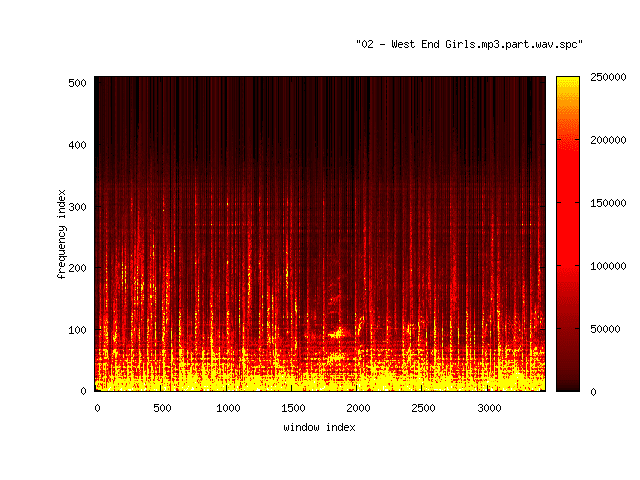
A spectrogram of 30 seconds of the part of Pet Shop Boys "West End Girls" song starting from 1:00

Spectrograms can be obtained by Short Time Fourier Transform. The audio samples are grouped into analysis time windows (preferably overlapping) wi of equal length N, with wi denoting the i-th window. For each window the Fourier transform is calculated, giving a complex vector vi = STFT(wi) of the same length as the window. Because in this case the input given to the Fourier transform always are vectors of real numbers, the output complex vectors obey the symmetry:

vi[q] == -vi[N-q+1]

So the complete information is contained in the first N/2 components of the complex vector vi.

The Fourier transform decomposes the signal given by the samples inside each input window in terms of sine waves of discrete frequencies. These frequencies are integer multiples of the fundamental frequency which is determined by the window length N and the sampling rate S of the waveform representation. The frequency Fk for a particular index k in the complex vector may be calculated by using the following formula:

Fk = k * S / N , where k = 0, ... ,N/2

The first frequency F0 is always zero. If we have a sampling rate of 44100 Hz and a window length of 1024 samples, the base frequency F1 is 43.0664 Hz and the maximum frequency F512 is the Nyquist rate 22050 Hz.

Then we need the absolute value for each component of vk to get a measure of how strongly a discrete frequency Fk is present in the decomposition of the i-th window of audio file. This data can then be used for plotting the spectrogram. When the spectrogram is plotted the fingerprint points are chosen to be points that are local maximum within regions of fixed size surrounding the point. Larger region size leads to fewer but possibly more significant points. The resulting features are saved as pairs of integer numbers (i, k) with i being the window index and k being the frequency index.

Friday, 7 November 2008

Structure Of *.wav Audio Files

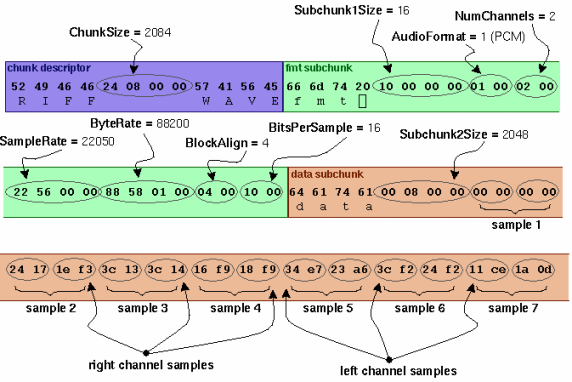
Wave file structure is very simple. The structure can be divided into 3 parts (chunks).

First chunk: The first 4 bytes should be "RIFF". Then come 4 bytes, which indicate the size of file. Then comes "WAVE".

Second chunk: It starts with "fmt ". Then come 4 bytes showing the length of "fmt " chunk. Then come audio format, number of channels, sample rate, Byterate, Block align and bits ber sample.

Third chunk: It is the audio data itself. As always 4 first bytes - name of the chunk. 4 bytes after that - the length of the chunk in bytes. After that come samples itself. 2 * number_of_channels bytes each sample.

There can be also other chunks between the first and the third, but they are really not widely used. If you got interested in it, a very good article about "Wave file format" is on The Sonic Spot.

So we have here an example. We see the first chunk (purple). It shows the length of the file - 0x(00 00 08 24) = 0x824 = 2084

Bytes should be read in reverse direction. First read byte has the smallest rank!

You can check yourself: left channel sample #5 = 0xE734 and right one is 0xA623.


Continued there...

Going to English

I decided to continue writing here in English. So I can be read by much more audience. I hope my English is as good as my native language. Will see if it works so. :)

Wednesday, 3 September 2008

Install Ubuntu 8.04 on Asus Eee PC 1000h

Приобрёл себе Asus Eee Pc 1000H. Установленный там Xandros что-то не очень вдохновил, поэтому решил поставить туда свою любимую Ubuntu. Что для этого нужно было сделать...

Создание загрузочной USB и установка Ubuntu.

Об создании загрузочной флэшки очень хорошо написано на официальном сайте Ubuntu. Я выбрал вариант с UNetbootin.

Загрузка и установка проблем вызвать не должна, поэтому детальное описание опускаю.

После установки

Не работает сеть (ни ethernet, ни wifi), некоторые комбинации клавиш (Fn+F2, Fn+F7, Fn+F8, Fn+F10/F11/F12 ), вебкамера.

Настройка сети

Самый простой способ на мой взгляд - это установка неофициального специального Ubuntu kernel, оптимизированного под Eee Pc.

Shortcuts

Шорткаты устанавливаются благодаря http://forum.eeeuser.com и его пользователю elmurato. Нужно скачать его скрипты и установить. К сожалению шорткаты начинают работать только после логина. Так что если вам надо отключить звук во время загрузки, у вас это получится только вставив наушники.

WebCam

BIOS. Onboard devices. WebCam Enabled.

Tuesday, 15 July 2008

Первые впечатления

Итак, делюсь первыпи впечатлениями, как ощущения после перехода с Ruby на C#. Пока всё, с чем я столкнулся, это неудобства:

Null class.
Отсутствие null как объекта. Затрудняет жизнь многочисленными провернками на null. Паттерн introduce null object не особо спасает. Писать для каждого класса нулевой объект не радует. Можно ли реализовать 1 общий класс, от которого всё наследуется?
System.Linq библиотека
Вроде бы удобная вещь, но! Она была нагло спислизана с ruby, причём сделано это очень криво. Зачем-то нужно было менять названия методов. Плюс были портированы не 1 в 1. В результате имеем:
Method alternatives
RubyC#
array.collectarray.select
array.selectarray.Where
array.detect ( = array.select.first )array.first
array.join( token )String.join(array, token)
Как видим, join метод стал вдруг методом String класса.
Много лишних слов
public overrride static void methodName() vs. def self.method_name
Консоль
Отсутствие консоли, где можно быстренько потестить какой-нибудь метод.

Или я просто предвзято отношусь к C# и Microsoft?